
The $1.3M onboarding leak: How a floating button killed a fintech app's growth


Most product teams debug their apps on the phones they carry. Flagship Samsung. Latest iPhone. Maybe a Pixel if someone on the team is that person.
And most of the time, that's fine.
But if you're building a fintech app for Latin America, Southeast Asia, or the Middle East, where a Galaxy A13, a Redmi Note 11, or a Motorola G32 is the default device, then "works on my phone" is a dangerous statement. The bugs that cost you the most money are the ones that don't exist on the devices sitting on your team's desks.
This is a story about one of those bugs. It lived for 11 months inside a fintech app's onboarding flow. It never triggered an error. It never caused a crash. It never showed up in Mixpanel, Amplitude, or Firebase. It just quietly prevented roughly 30,000 users per month from becoming customers.
The total damage? Conservatively, $1.3 million in lost first-year customer value. Every month.
"We've tried everything"
The company is a mid-market fintech app offering digital accounts, P2P transfers, and installment-based credit. About 1.7 million monthly active users, mostly across Latin America. Healthy growth. Real product-market fit.
But their onboarding was bleeding. Only 23% of users who started the signup process actually finished it.
Fintech onboarding is hard. KYC requirements, document uploads, identity verification. Nobody expects 90% completion. But industry benchmarks for apps with similar verification flows sit around 35-45%. This team was 12 points below the floor.
They'd spent four months attacking it. Shortened the flow from seven steps to four. Brought in a UX writer to rewrite every label and error message. Added progress bars, save-and-resume, biometric document capture. Ran A/B tests on buttons until the design team begged them to stop.
Some of it helped marginally. Nothing cracked the core problem.
Their analytics pinpointed the drop-off to Step 2: a screen called "Personal Details" where users entered their legal name, date of birth, national ID number, and nationality. Over 30,000 users reached that screen every month and vanished without completing it.
The maddening part? When anyone on the team opened the app and went through that screen themselves, it looked fine. Clean layout. Fields worked. Keyboard appeared. No issues.
When the numbers make sense but the story doesn't
Here's the monthly snapshot their analytics team stared at every Monday:
Started onboarding: 84,319
Reached Personal Details: 71,847
Completed Personal Details: 41,073
Completed full onboarding: 19,393
That 71,847 to 41,073 gap was the black hole. Users who'd already verified their email, agreed to terms of service, and were ready to hand over their identity details just stopped.
The team had theories. Maybe the ID number field was confusing. Maybe users didn't trust the app with their national ID yet. Maybe the form needed inline validation. Each theory became an experiment. Each experiment burned 2-3 weeks and moved the number by a fraction of a percent.
Nobody thought to question whether the screen itself was fundamentally broken for a chunk of their users. Because on their phones, it wasn't.
The first afternoon with session replay
The shift happened when their Head of Product decided to stop guessing and start watching. They set up UXCam's session replay on the onboarding flow, which took less than 20 minutes.
The product manager pulled their first batch of replays three days later.
They picked a session at random. A user on a Samsung Galaxy A13 (one of the most common phones in their market) had come in through a paid Instagram campaign. Verified email. Landed on Personal Details.
Four fields on the screen: legal name, date of birth, national ID, nationality.
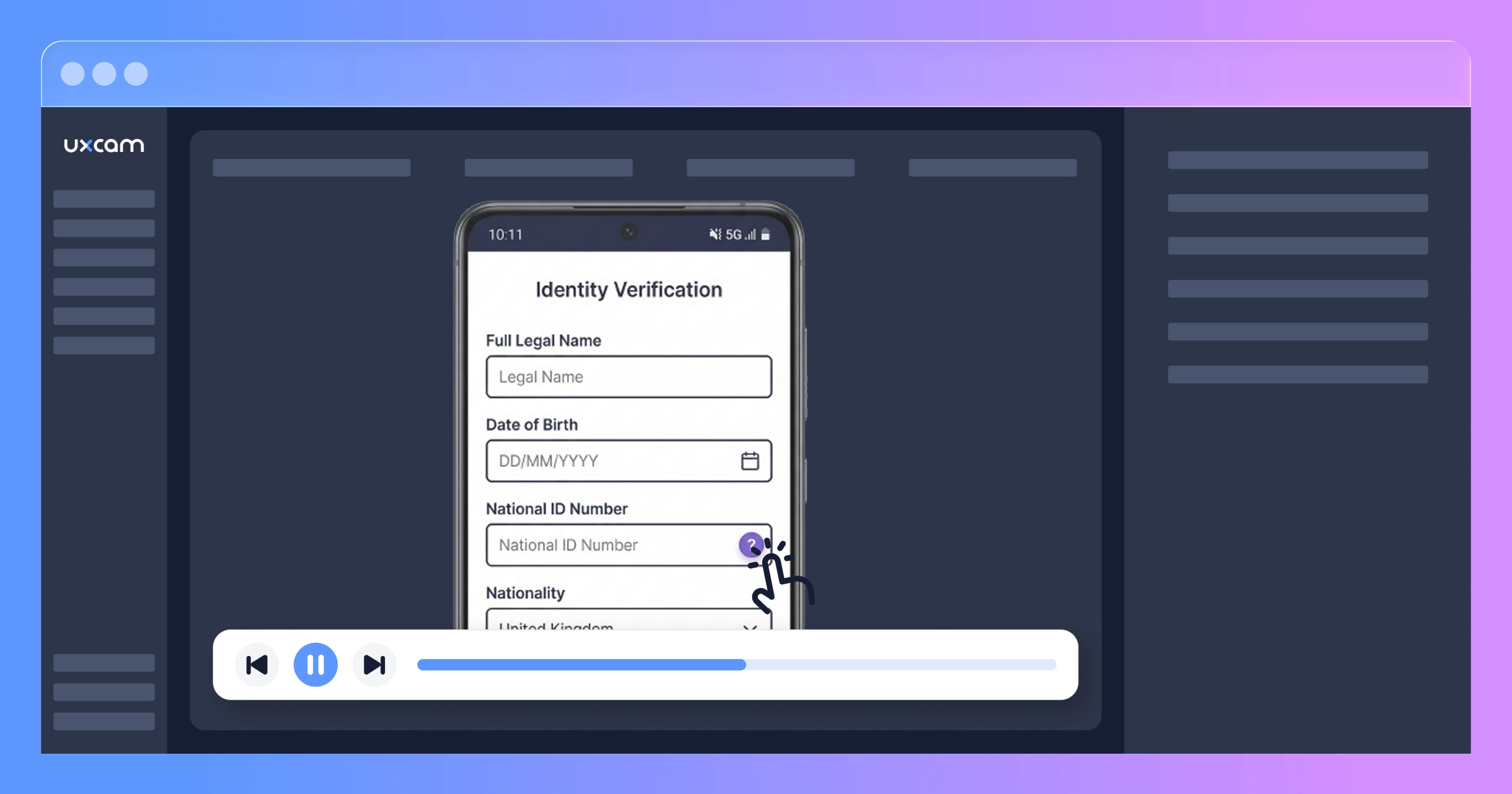
The user typed their name. Fine. Selected their birthday from the date picker. Fine. Then they went to tap the national ID field.
And a help modal popped up instead.
The product manager leaned forward. The user closed the modal, tapped again. Modal again. The user scrolled down, scrolled up, tried tapping slightly to the left. This time the nationality dropdown opened instead. An alphabetic keyboard appeared, wrong keyboard for a number field.
The user backspaced, tried to switch fields, entered three digits somewhere, realized they were typing into the wrong input. After 38 seconds of fighting the form, they hit the back button and were gone.
The PM watched 20 more sessions that afternoon. Nine of them showed the identical struggle.


The anatomy of an invisible bug
Here's what was going on.
Six months earlier, the platform team had added a floating help button, a little circle with a "?" icon, to several screens across the app. It lived in the bottom-right corner, 16dp from the screen edge. On the dashboard and transaction screens where it was originally designed, it sat comfortably below all interactive elements.
Then the onboarding team redesigned the Personal Details screen. New field layout, new spacing, new component library. Nobody checked whether the global help button's fixed position would conflict with the new form.
On phones with tall screens (the Pixel 7, iPhone 14, Galaxy S23), there was enough vertical space that the button floated harmlessly below the last form field. No overlap. No issue. These were the phones the team used for QA.
On phones with shorter viewport heights (the Galaxy A13, the Xiaomi Redmi 10, the Moto G32, basically the devices that made up roughly 37% of their actual user base) the button parked itself right on top of the national ID number field.
But the positioning overlap was only the beginning. Three separate issues stacked on top of each other:
The overlap itself. The help button intercepted taps meant for the ID number field. Users got a help modal they didn't ask for and had no idea why.
Accidental field activation. When users tried to tap around the help button, they'd often hit the nationality dropdown instead. The tap targets were tight on smaller screens. This activated the dropdown and switched the keyboard to alphabetic mode.
Keyboard type not recovering. On several Android skins (MIUI, One UI 3.x), once the alphabetic keyboard appeared from the dropdown activation, it wouldn't switch back to numeric when the user finally managed to focus the ID field. The input type hint wasn't being re-read after a focus change. Users saw a QWERTY keyboard for a field that expected numbers.
Any one of these alone would have been an annoyance. Together, they turned a simple form into an impossible task for more than a third of the user base.
The event log that looked perfectly normal
Here's the thing that should scare you: the analytics captured every event on this screen. And none of them looked abnormal.
user_reached_personal_details
user_tapped_help_button
user_dismissed_help_modal
user_tapped_help_button
user_dismissed_help_modal
user_left_onboarding
Every event fired correctly. The user_tapped_help_button metric was actually elevated on this screen, but the team read that as "users need more help during this step." They were two weeks into scoping a better tooltip tutorial for the form when the PM started watching the replays.
They were about to build a more detailed help experience for a button that was causing the problem.
No crash reports. No error logs. No exceptions. The app was doing exactly what the code told it to do. The help button opened when tapped. The keyboard appeared when a field received focus. Every individual component worked as specified.
The problem was physical. A spatial conflict between UI elements that only materialized on a specific range of screen sizes. Event-based analytics are structurally blind to this. They track what happened (user left), not why (because a button was physically covering the field they needed).
From "I think I see a pattern" to "I know exactly what's wrong"
The PM had found the problem in 20 replays. But they needed more than a hunch. They needed to quantify it, understand the device distribution, and confirm there weren't other issues hiding in the flow.
Watching a thousand sessions manually would take weeks. So they opened Tara AI.
Tara is UXCam's AI product analyst. She doesn't analyze event tables or metadata. She watches session recordings the way a human analyst would, frame by frame. She sees what users try to do, where they hesitate, what confuses them, and where things silently fail. She catches issues that were never instrumented because they were never anticipated.
The PM asked: "Why are users dropping off on the Personal Details screen during onboarding?"


Tara pulled abandoned onboarding sessions, watched them, and identified the core pattern:


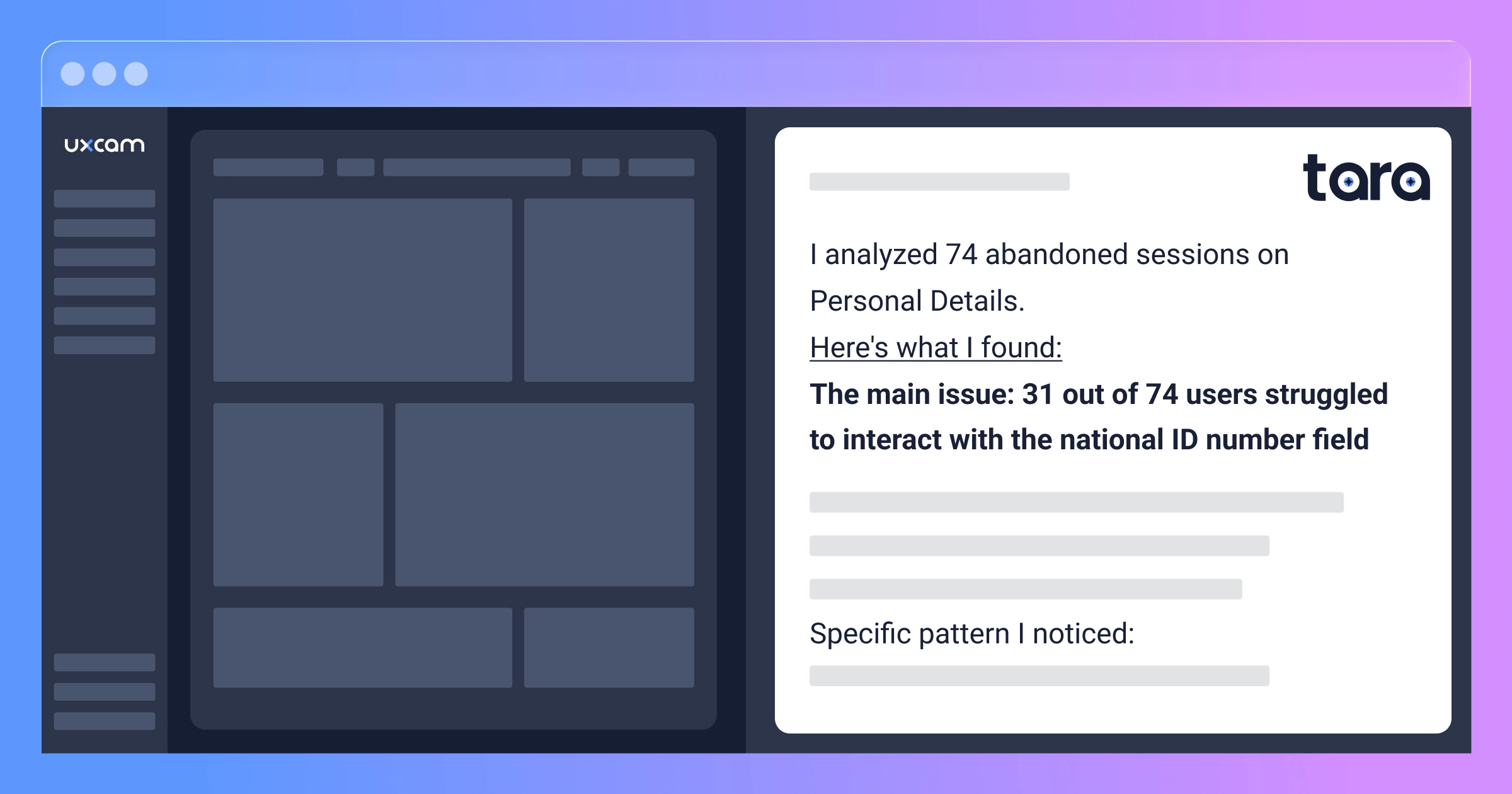
Tara's analysis:
Across 74 abandoned sessions on Personal Details, 31 showed the same behavioral pattern: users repeatedly attempted to interact with the national ID number field but a floating UI element intercepted their taps.
The pattern I'm observing: user taps the ID field area, a help modal appears, user dismisses it, tries again, either the modal reappears or the nationality dropdown activates instead, keyboard shows alphabetic layout for a numeric field, user attempts to correct, abandons after 30-45 seconds.
This appears device-dependent. Sessions on larger-screen devices don't show the overlap issue.
Sessions worth reviewing:
Session #4418: Six tap attempts, three accidental help modal triggers, abandons at 41 seconds
Session #4455: User enters text in nationality field by accident, can't recover, leaves
Session #4502: User successfully gets past the field on second try but abandons the next screen (possible frustration carryover)
Everything else in the flow works smoothly. Users complete email verification with no friction, and those who make it past the ID field finish the remaining steps quickly.
That last insight reframed the entire problem. The onboarding flow wasn't broadly broken. There was a single chokepoint, and it was this one field on this one screen on a specific set of devices.
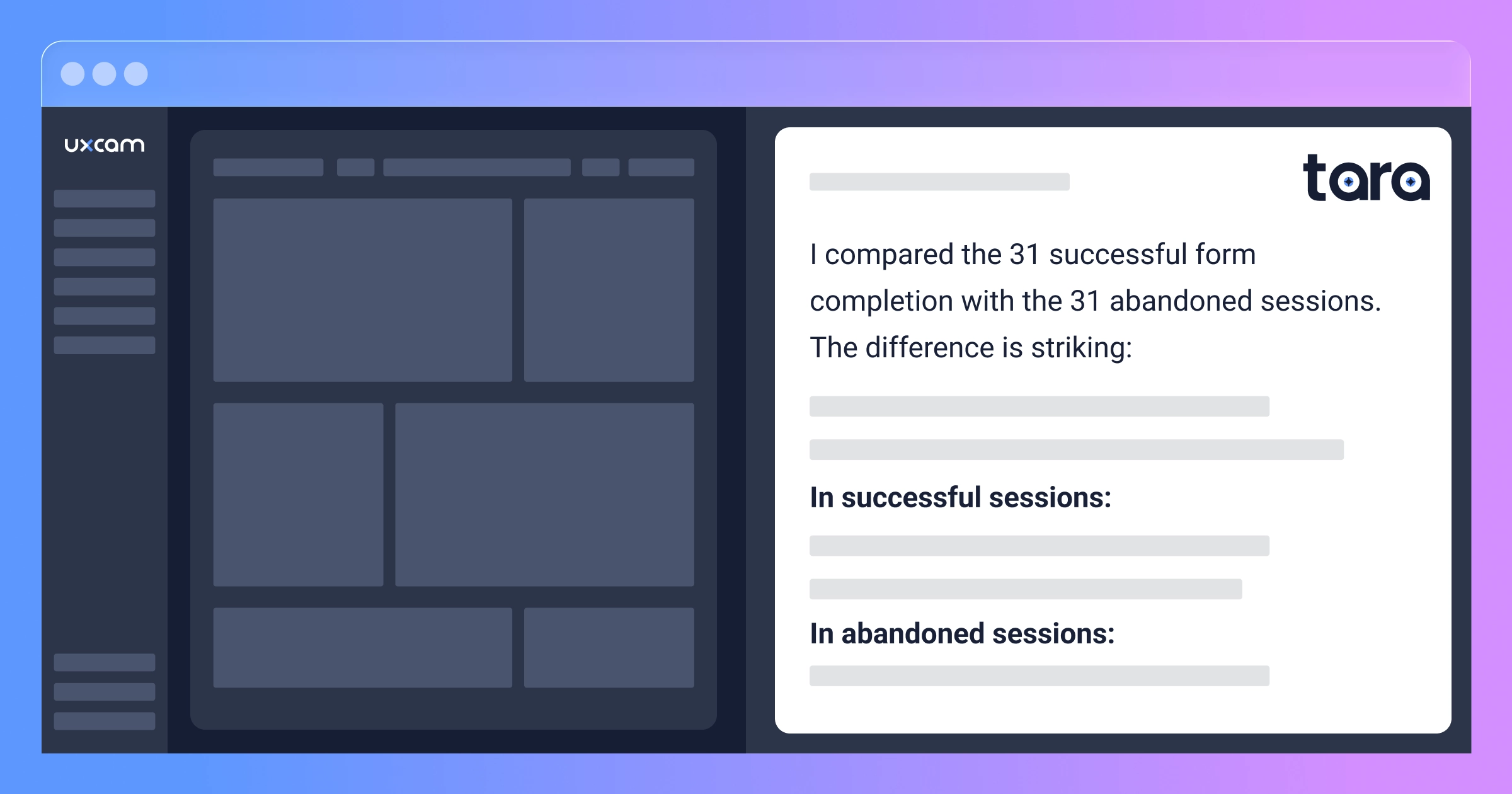
The product manager followed up: "Compare how users interact with the Personal Details form in successful versus abandoned sessions."


Tara's comparison:
In successful sessions, users move through fields in order (name, date of birth, ID, nationality), tapping each field once. Total time on screen: 20-35 seconds. No help modal interactions. Keyboards switch correctly between text and numeric.
In abandoned sessions, users reach the ID field and get stuck. They tap 3-6 times in the same area. Help modal appears 1-4 times per session. Users jump between fields erratically. Time on screen stretches to 35-65 seconds before they quit.
The dividing factor: in successful sessions, the floating button doesn't overlap the ID field. These appear to be larger-screen devices. In abandoned sessions, the button is positioned directly over the field's input area.
Ten minutes with Tara gave the product manager what weeks of manual analysis would have: the root cause, the device pattern, the behavioral signature, and specific sessions as evidence they could play back in a meeting.


The nine-day fix
Knowing the problem and fixing it are different things. The floating help button was a global component owned by the platform team. It appeared on 14 screens. Moving it for one screen meant special-casing the positioning logic, which the platform team initially resisted.
There was also a stakeholder who had originally championed the help button placement. "Our help engagement rates are actually great on that screen," they pointed out in the review, not realizing those "engagements" were users accidentally tapping a button that was blocking the thing they actually wanted.
The PM played three session replays in the meeting. A user trying six times to enter their ID number. Another accidentally filling in the wrong field and spiraling. A third who sat motionless for 22 seconds after their fourth failed attempt, not tapping anything, not scrolling, just staring at a screen that refused to cooperate, before closing the app.
That 22-second pause changed the room.
Nine days later, the fix was live:
Dynamic positioning. The help button now detects viewport height and repositions to the top-right corner when it would overlap form elements.
Tap target isolation. A 12dp exclusion zone around form fields prevents the button from rendering in conflict areas.
Keyboard type enforcement. Explicit input type declarations that re-fire on focus, fixing the stuck-keyboard behavior on affected Android skins.
Visual focus indicator. A colored border and subtle pulse animation on the active field, so users always know where their cursor is.
They rolled it to 15% of traffic first. The replays from that cohort told the whole story: users tapped the ID field once, the numeric keyboard appeared, they typed their number, and moved on. Full deployment happened 72 hours later.
What changed when the form stopped fighting users
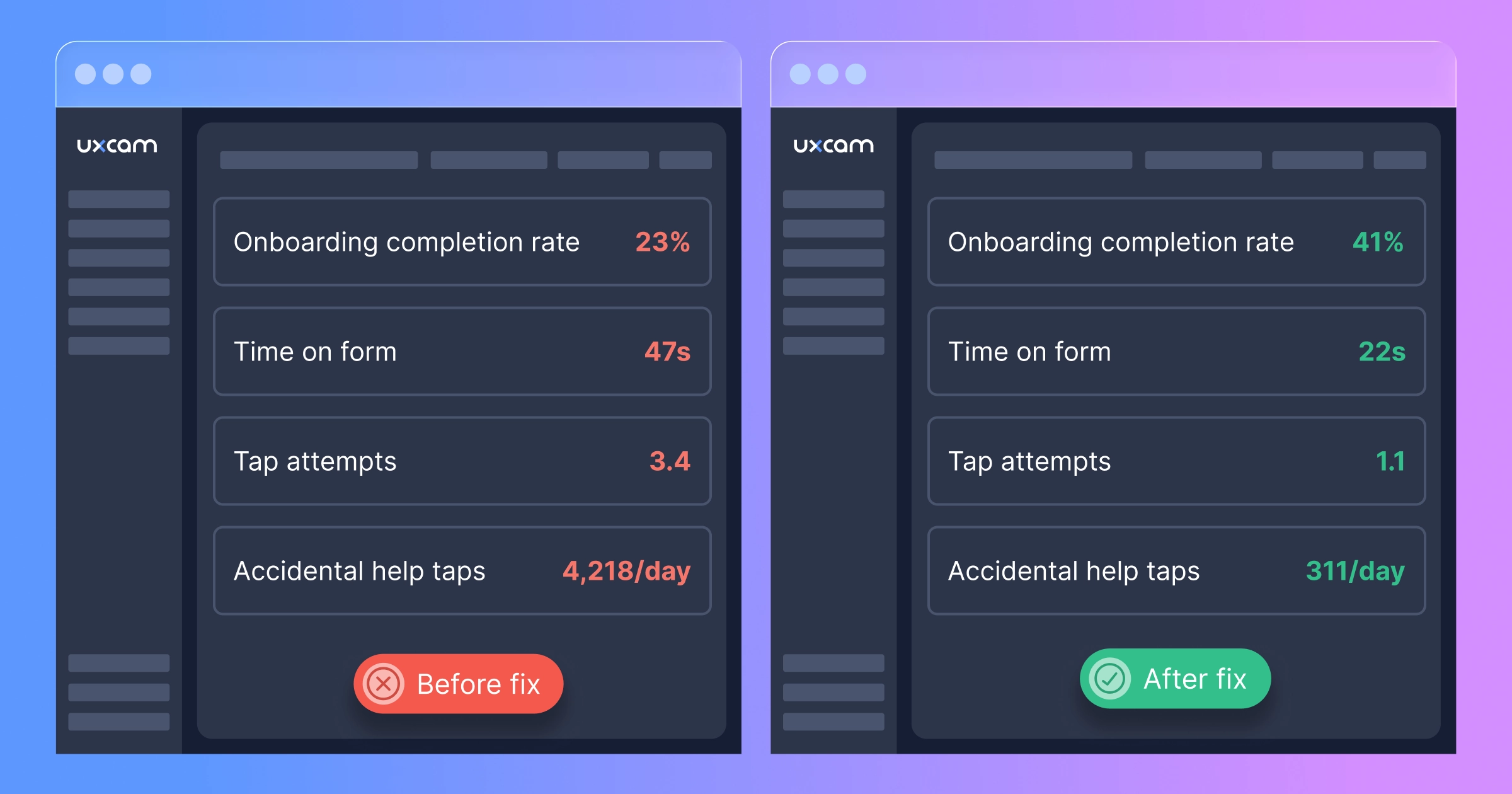
Before:
Onboarding completion: 23%
Personal Details screen completion: 57% of those who reached it
Average time on Personal Details: 47 seconds
Help button taps per day on that screen: 4,218 (mostly accidental)
Average tap attempts on ID field before success or abandonment: 3.4
After:
Onboarding completion: 41%
Personal Details screen completion: 89%
Average time on Personal Details: 22 seconds
Help button taps per day: 311 (intentional)
Average tap attempts on ID field: 1.1
A 78% increase in onboarding completion.
Additional activated users per month: 15,178
Average first-year revenue per activated user: $87
Monthly recovered value: $1,320,486
Over the 11 months the bug existed: roughly $14.5 million in first-year customer value, gone. Not because of a server outage or a payment failure or a bad marketing campaign. Because a help button was in the wrong place on the phones their users actually owned.


The user who rotated their phone
Here's the detail from this story that stuck with me.
When the team dug into the data after the fix, they found something unexpected. Over 200 users had completed onboarding by rotating their phone to landscape orientation specifically on the Personal Details screen, then rotating back to portrait for the rest of the flow.
Two hundred people had independently figured out that landscape mode shifted the layout enough to move the help button away from the ID field. They'd discovered a workaround to a bug that the product team didn't know existed.
None of them filed a support ticket. None of them left app store feedback. They just solved it themselves and moved on.
For every user resourceful enough to figure that out, there were probably a thousand who assumed the app was broken and left. These users wanted to sign up badly enough to experiment with rotating their phone. Imagine how many people had less patience.
That's the thing about silent UI failures in fintech. Users aren't casually browsing. They've already made the decision to trust you with their identity, their documents, their money. When the form doesn't cooperate, they don't think "oh, must be a UI bug." They think "something's wrong with this app" and they go sign up for a competitor.
Why fintech onboarding is uniquely exposed
E-commerce checkout has a version of this problem too (the $2M form field story is proof). But fintech onboarding faces pressures that make silent UI bugs even more damaging.
You can't simplify past a regulatory floor. KYC requirements mean you can't skip the ID field or defer it. Every form field exists because a regulation demands it. If any one of them is broken, the entire flow is blocked. There's no "continue as guest" escape hatch.
Trust breaks in one direction. A user handing over their national ID number is making a leap of faith. Any friction at that moment doesn't read as "minor bug." It reads as "this app can't be trusted with my data." Once that impression forms, it's very hard to reverse.
Onboarding is usually a one-shot moment. Unlike a checkout flow where users might come back next week, fintech onboarding is a commitment. If the experience fails, the user downloads a competitor and signs up there. The switching cost is near zero.
Device diversity isn't a test matrix, it's your entire user base. If you're serving LATAM, MENA, or SEA, your users are on hundreds of different Android models with wildly different screen sizes, OS skins, and keyboard behaviors. The device your team uses for QA represents maybe 5% of your actual traffic.
Finding your version of this bug
Your problem might not be a floating button. Maybe a sticky header covers the top of a form when the keyboard opens. Maybe a confirmation checkbox is unreachable on smaller screens. Maybe a document upload button falls below the fold. Maybe your OTP input field loses focus on certain Android versions.
The category is the same: something that works perfectly on QA devices but fails on the phones your actual users carry.
Set up session replay on your critical onboarding screens
Install the UXCam SDK and configure it to capture your key onboarding steps. Account creation, identity verification, document upload, first transaction. For fintech apps, UXCam automatically masks sensitive field content, so you see the interaction (taps, hesitations, keyboard changes) without seeing the actual data users enter. Setup takes less than 20 minutes.
Setup guide: UXCam's developer center.
Give it a few days to collect sessions from your real device mix
You need sessions from the actual phones your users carry, not just the ones in your test lab. Three to five days usually gets you enough volume to see real patterns, especially on the mid-range Android devices where device-specific issues tend to cluster.
Point Tara AI at your biggest drop-off
Instead of manually scrubbing through hundreds of sessions, ask Tara to do the analysis. She watches recordings frame by frame, the same way a human analyst would, but across dozens of sessions in minutes instead of weeks.
Start with: "Why are users dropping off during [your onboarding step]?"
Then go deeper: "What patterns do you see in how users interact with the form on [screen name]?" or "What's different between users who complete identity verification and those who abandon?"
Tara will tell you which elements are causing friction, what the behavioral pattern looks like, and point you to specific sessions as evidence. She catches spatial issues, keyboard problems, and interaction failures that never generate error logs. Exactly the kind of bugs that live undetected for months.
Fix it, ship it, and make monitoring a habit
The PM on this team now checks in with Tara every Monday. Five minutes. "Anything new in the onboarding flow?" Since the floating button fix, they've caught two more issues, both minor, both resolved within a sprint, both before they showed up in any conversion metric.
The $1.3 million per month they're recovering isn't from some massive product overhaul. It's from fixing a single floating button that nobody could see on their own phone. The expensive part wasn't the fix. It was the 11 months they didn't know it was broken.
Session replay isn't a nice-to-have for fintech. It's infrastructure.
Dashboards tell you where users drop off. Crash analytics tell you when the app breaks. Neither one tells you that a button is covering a form field on 37% of devices.
That gap between "what happened" and "why it happened" is where the most expensive bugs live. And in fintech, where every onboarding failure is a customer lost to a competitor, that gap costs real money every single day it stays open.
UXCam's session replay shows you what users actually experience on their devices. Tara AI watches those sessions for you, identifying friction, spotting device-specific patterns, and surfacing the problems that no amount of event tracking will ever catch.
Start your free trial today or request a demo.
Point Tara at your onboarding flow and ask: "What are the biggest frictions users are experiencing during signup?"
You might find out your app works perfectly. Or you might find out there's a floating button, or something like it, that's been quietly costing you seven figures.
How long has yours been there?
Company name and identifying details have been changed. The bugs, the behavioral patterns, the device-specific nature of the problem, and the financial impact are all real.
AUTHOR
Carolina Soares
Customer Success Manager
Carol is a Customer Success Manager at UXCam with over 7 years of experience driving SaaS growth. Specialized in the intersection of UX insights and business strategy, she helps enterprise clients translate complex user data into measurable product adoption and long-term retention.


Related articles


Case Studies
O campo de formulário de $2M: como um app de e-commerce perdeu milhões por um único erro de UX
Um único campo de formulário de checkout causou frustração silenciosa nos usuários, abandono em massa e mais de $2 milhões em perda de receita. Veja como a Gravação de sessão expôs essa falha de...
Carolina Soares
Customer Success Manager


Case Studies
O vazamento de onboarding de US$ 1,3 milhão: Como um botão flutuante matou o crescimento de um app de fintech
Um app de fintech perdeu US$ 1,3 milhão em valor de cliente no primeiro ano porque um elemento de interface flutuante bloqueou silenciosamente o onboarding. Gravação de sessão e análise de IA expuseram o problema...
Carolina Soares
Customer Success Manager
Case Studies
The $1.3M onboarding leak: How a floating button killed a fintech app's growth
A fintech app lost $1.3M in first-year customer value because a floating UI element silently blocked onboarding. Session replay and AI analysis exposed the invisible...
Carolina Soares
Customer Success Manager
What’s UXCam?





